Deploying the core networking layer

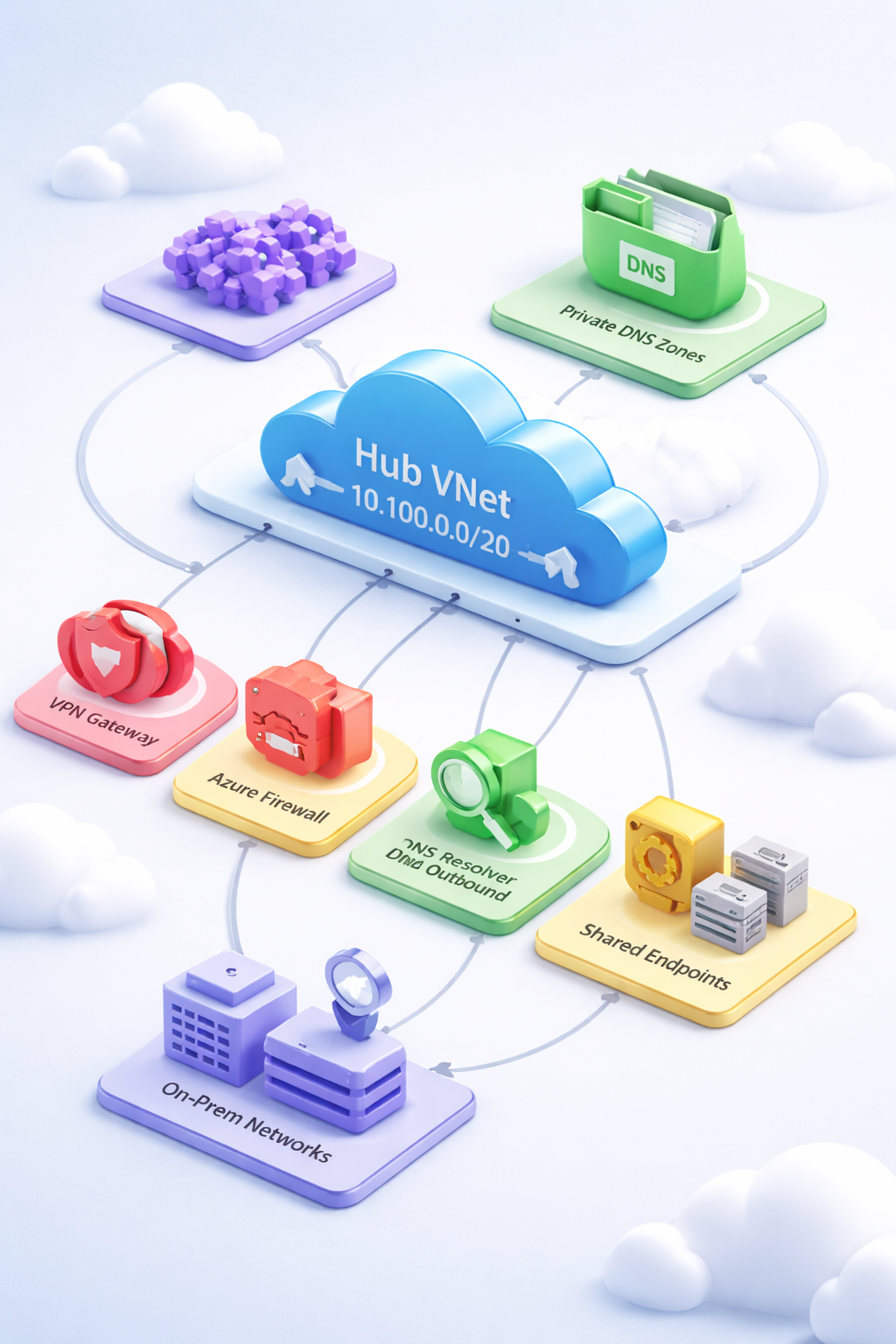
This is the first hands-on deployment in the series. By the end of this article you will have a working hub virtual network in Azure: firewall, VPN gateway, DNS private resolver, private DNS zones covering all Azure PaaS services, route tables, and NSGs — all managed as Terraform code you can version, review, and redeploy from scratch.
The architecture deployed here is the networking layer described previously. Read that before continuing if you haven’t — the decisions explained there are assumed here, not repeated.
Part 1: What this deploys
flowchart TB

%% Mobile-first Azure Connectivity Hub (colorized)

classDef hub fill:#e6f2ff,stroke:#1a73e8,color:#000,stroke-width:2px;
classDef security fill:#ffe9e9,stroke:#d93025,color:#000,stroke-width:2px;
classDef dns fill:#e8f5e9,stroke:#188038,color:#000,stroke-width:2px;
classDef shared fill:#fff8e1,stroke:#f9ab00,color:#000,stroke-width:2px;
classDef external fill:#f3e8ff,stroke:#9334e6,color:#000,stroke-width:2px;
classDef infra fill:#f5f5f5,stroke:#5f6368,color:#000,stroke-width:2px;

subgraph CONN["Connectivity Subscription"]

    subgraph HUBRG["Hub Resource Group"]

        HUB["Hub VNet
10.100.0.0/20"]
        GW["VPN Gateway
GatewaySubnet
10.100.0.0/27"]
        FW["Azure Firewall
AzureFirewallSubnet
10.100.1.0/26"]
        DNSIN["DNS Resolver
Inbound"]
        DNSOUT["DNS Resolver
Outbound"]
        SHARED["Shared Services"]
        PE["Private Endpoints"]
        SPOKES["Future Spoke VNets
10.101.x.x – 10.105.x.x"]

    end

    subgraph DNSRG["DNS Resource Group"]
        ZONES["Private DNS Zones"]
    end
end

ONPREM["On-Prem Networks"]

HUB --> GW
HUB --> FW
HUB --> DNSIN
HUB --> DNSOUT
HUB --> SHARED
HUB --> PE

SPOKES -. Peering + UDR .-> HUB
ONPREM --> GW
ZONES -. VNet Link .-> HUB

class HUB hub
class GW,FW security
class DNSIN,DNSOUT,ZONES dns
class SHARED,PE shared
class SPOKES,ONPREM external
class CONN,HUBRG,DNSRG infra
Seven subnets occupy the hub VNet address space at 10.100.0.0/20. Five are reserved for network infrastructure with exact names required by Azure. Two (snet-shared, snet-pe) are available for platform resources and private endpoints from the first deployment onwards.
The Azure Firewall is the inspection point for all inter-spoke and internet-bound traffic. Every spoke will eventually carry a route table with 0.0.0.0/0 → VirtualAppliance → firewall private IP. The firewall policy is configured with DNS proxy enabled — this means VMs throughout the estate can point their DNS servers at the firewall’s private IP and get Azure DNS resolution including private link zones.
The VPN Gateway creates the on-premises connectivity path. No site-to-site connection is configured in this article — that requires on-premises device details — but the gateway must exist before those connections can be created, and subnets cannot be added to an existing deployment without deletion.
The DNS Private Resolver provides hybrid DNS capability. The inbound endpoint (provisioned in this deployment at 10.100.3.0/28) accepts queries forwarded from on-premises DNS servers, enabling resolution of private link zones from on-premises. The outbound endpoint (at 10.100.3.16/28) enables Azure VMs to forward queries to on-premises DNS — this is wired up when VPN connectivity is established.
The ~82 private DNS zones cover every Azure PaaS service that supports Private Link. All zones are linked to the hub VNet. When spoke VMs resolve staccountprod.blob.core.windows.net after a private endpoint is created, the query resolves to the private endpoint’s NIC IP rather than the storage account’s public IP.
The route table created here is the template applied to spoke subnets during subscription vending. It is not attached to any subnet in this deployment — there are no spokes yet.
Cost awareness
Running this configuration for a few hours costs approximately:
| Resource | Approx. hourly rate |
|---|---|
| Azure Firewall Standard | ~$1.25/hr |
| VPN Gateway VpnGw2AZ | ~$0.38/hr |
| DNS Private Resolver (2 endpoints) | ~$0.02/hr |
| Private DNS zones | Negligible |
| DDoS Protection Plan | Disabled by default ($2,944/mo if enabled) |
Expect $10–20 for a typical session. The terraform destroy at the end of this article removes all resources.
Part 2: Deployment
Prerequisites
- Terraform 1.12 or later
- Azure CLI 2.61 or later, authenticated with
az login - Contributor access on an Azure subscription designated as the Connectivity subscription
- The address plan from the previous article (or your own, so long as it’s consistent)
This deployment targets your Connectivity subscription. If you are using a single subscription for learning, that subscription is also your Connectivity subscription for these purposes.
Step 1: Bootstrap remote state storage
Terraform state cannot live in the repository. Before running any Terraform command, create the Azure Blob Storage backend. This is a one-time operation — the storage account persists across all layers.
Run this from a PowerShell terminal. The storage account name must be globally unique, so the script appends a random suffix:
$RG       = "rg-terraform-state"
$LOCATION = "eastus"
$SA       = "sttfstate$(Get-Random -Maximum 9999)"
$CONTAINER = "tfstate"

az group create --name $RG --location $LOCATION

az storage account create `
  --name $SA `
  --resource-group $RG `
  --location $LOCATION `
  --sku Standard_ZRS `
  --kind StorageV2 `
  --min-tls-version TLS1_2 `
  --allow-blob-public-access false `
  --allow-shared-key-access false

az storage container create `
  --name $CONTAINER `
  --account-name $SA `
  --auth-mode login

# Grant the current user Storage Blob Data Contributor on the container
$STORAGE_ID = az storage account show --name $SA --query id -o tsv
$PRINCIPAL  = az ad signed-in-user show --query id -o tsv

az role assignment create `
  --role "Storage Blob Data Contributor" `
  --assignee $PRINCIPAL `
  --scope "$STORAGE_ID/blobServices/default/containers/$CONTAINER"

Write-Output "Storage account name: $SA"
Write-Output "Record this — you will need it in backend.tf"
Record the storage account name. It cannot be changed after backend configuration is written and initialized.
The --allow-shared-key-access false flag disables access key authentication on the storage account, forcing all access through Azure RBAC. This removes the access key as an attack surface. The Storage Blob Data Contributor role on the container is the minimum needed for Terraform state operations.
Step 2: Create the project structure
Create a directory named networking and add the following empty files:
networking/
├── versions.tf
├── providers.tf
├── backend.tf
├── variables.tf
├── locals.tf
├── main.tf
├── outputs.tf
└── terraform.tfvars
Each file has a defined responsibility. main.tf contains module calls and resources. variables.tf declares all input variables — no defaults that would silently override intention. outputs.tf exposes the values downstream layers need.
Step 3: versions.tf
terraform {
  required_version = ">= 1.12"

  required_providers {
    azurerm = {
      source  = "hashicorp/azurerm"
      version = "~> 4.0"
    }
    azapi = {
      source  = "azure/azapi"
      version = "~> 2.4"
    }
  }
}
The hub-and-spoke AVM module requires both azurerm and azapi. AzAPI handles management operations that benefit from direct ARM API access — particularly cross-subscription resource references and resources where AzureRM coverage lags behind Azure’s release cadence. Both providers target the same subscription.
Step 4: providers.tf
provider "azurerm" {
  subscription_id = var.connectivity_subscription_id
  features {}
}

provider "azapi" {
  subscription_id = var.connectivity_subscription_id
}
Both providers target the Connectivity subscription. If your Terraform state storage account is in a different subscription, the backend authenticates independently from the providers — backend credentials are resolved from Azure CLI context, not from provider configuration.
Step 5: backend.tf
terraform {
  backend "azurerm" {
    resource_group_name  = "rg-terraform-state"
    storage_account_name = "sttfstate<your-value>"  # Replace with bootstrap output
    container_name       = "tfstate"
    key                  = "connectivity.terraform.tfstate"
    use_azuread_auth     = true
  }
}
Replace sttfstate<your-value> with the storage account name from Step 1. The key value is the blob path within the container — connectivity.terraform.tfstate follows the convention <layer>.terraform.tfstate used across all layers in this series.
use_azuread_auth = true authenticates using your Azure CLI session credentials rather than a storage account access key. In CI/CD pipelines, add use_oidc = true and a client_id for workload identity federation.
Step 6: variables.tf
variable "connectivity_subscription_id" {
  type        = string
  description = "The subscription ID for the Connectivity landing zone."
}

variable "location" {
  type        = string
  description = "The Azure region for all hub resources."
  default     = "eastus"
}

variable "hub_address_space" {
  type        = list(string)
  description = "The address space for the hub virtual network."
  default     = ["10.100.0.0/20"]
}

variable "enable_vpn_gateway" {
  type        = bool
  description = "Deploy a VPN Gateway. Adds 30–45 minutes to the apply time and ~$0.38/hr in cost."
  default     = true
}

variable "enable_ddos_protection" {
  type        = bool
  description = "Enable DDoS Network Protection. Costs ~$2,944/month flat. Disable for non-production."
  default     = false
}

variable "tags" {
  type        = map(string)
  description = "Tags applied to all resources in addition to the default managed tags."
  default     = {}
}
enable_vpn_gateway defaults to true because the gateway subnet must be reserved now regardless. If cost is a concern during the tutorial, set it to false in terraform.tfvars — you can add the gateway later without touching the subnet layout. enable_ddos_protection is false by default; the DDoS plan costs more per month than the rest of this deployment combined.
Step 7: locals.tf
locals {
  common_tags = merge(
    {
      managed-by  = "terraform"
      layer       = "connectivity"
      environment = "production"
    },
    var.tags
  )

  hub_name    = "vnet-hub-${var.location}"
  rg_hub_name = "rg-connectivity-hub-${var.location}"
  rg_dns_name = "rg-connectivity-dns-${var.location}"

  # Subnet CIDRs derived from the hub address space defined in Article 3.
  # These are intentionally hardcoded, not computed — subnet ranges are
  # architectural decisions, not values that should change based on input.
  subnets = {
    gateway                  = "10.100.0.0/27"
    firewall                 = "10.100.1.0/26"
    bastion                  = "10.100.2.0/26"
    dns_resolver_inbound     = "10.100.3.0/28"
    dns_resolver_outbound    = "10.100.3.16/28"
    shared_services          = "10.100.4.0/24"
    private_endpoints        = "10.100.5.0/24"
  }
}
Subnet CIDRs are defined as constants rather than computed from var.hub_address_space. They are not arbitrary within the /20 — they reflect a documented address plan. Deriving them programmatically from the parent CIDR would suggest they can vary, which is misleading.
Step 8: main.tf
This file contains four logical sections: resource groups, NSGs, the hub module, and the private DNS zones module.
8a — Resource groups
resource "azurerm_resource_group" "hub" {
  name     = local.rg_hub_name
  location = var.location
  tags     = local.common_tags
}

resource "azurerm_resource_group" "dns" {
  name     = local.rg_dns_name
  location = var.location
  tags     = local.common_tags
}
Two resource groups with distinct purposes. Hub networking resources (firewall, gateways, NSGs, resolvers) go in the hub RG. Private DNS zones go in the DNS RG — their lifecycle differs from network infrastructure and access policies for them are often broader than for hub networking.
8b — NSGs
The AzureFirewallSubnet, GatewaySubnet, and AzureFirewallManagementSubnet cannot have NSGs — Azure rejects deployments that attempt it. The AzureBastionSubnet requires specific rules; since Bastion is not deployed in this layer, the subnet is created without an NSG for now. The snet-shared and snet-pe subnets get baseline NSGs.
resource "azurerm_network_security_group" "shared_services" {
  name                = "nsg-snet-shared-${var.location}"
  location            = azurerm_resource_group.hub.location
  resource_group_name = azurerm_resource_group.hub.name
  tags                = local.common_tags

  security_rule {
    name                       = "AllowInboundHub"
    priority                   = 100
    direction                  = "Inbound"
    access                     = "Allow"
    protocol                   = "*"
    source_address_prefix      = "10.100.0.0/20"
    source_port_range          = "*"
    destination_address_prefix = "*"
    destination_port_range     = "*"
  }

  security_rule {
    name                       = "DenyAllInbound"
    priority                   = 4096
    direction                  = "Inbound"
    access                     = "Deny"
    protocol                   = "*"
    source_address_prefix      = "*"
    source_port_range          = "*"
    destination_address_prefix = "*"
    destination_port_range     = "*"
  }
}

resource "azurerm_network_security_group" "private_endpoints" {
  name                = "nsg-snet-pe-${var.location}"
  location            = azurerm_resource_group.hub.location
  resource_group_name = azurerm_resource_group.hub.name
  tags                = local.common_tags

  security_rule {
    name                       = "AllowInboundHub"
    priority                   = 100
    direction                  = "Inbound"
    access                     = "Allow"
    protocol                   = "*"
    source_address_prefix      = "10.100.0.0/20"
    source_port_range          = "*"
    destination_address_prefix = "*"
    destination_port_range     = "*"
  }

  security_rule {
    name                       = "DenyAllInbound"
    priority                   = 4096
    direction                  = "Inbound"
    access                     = "Deny"
    protocol                   = "*"
    source_address_prefix      = "*"
    source_port_range          = "*"
    destination_address_prefix = "*"
    destination_port_range     = "*"
  }
}
8c — Hub module
module "hub" {
  source  = "Azure/avm-ptn-alz-connectivity-hub-and-spoke-vnet/azurerm"
  version = "0.16.12"

  hub_and_spoke_networks_settings = {
    enabled_resources = {
      ddos_protection_plan = var.enable_ddos_protection
    }
    ddos_protection_plan = var.enable_ddos_protection ? {
      name     = "ddos-plan-${var.location}"
      location = var.location
    } : null
  }

  hub_virtual_networks = {
    primary = {
      location = var.location

      enabled_resources = {
        firewall                              = true
        firewall_policy                       = true   # Internal policy — see note below
        bastion                               = false  # Deployed in the security layer
        virtual_network_gateway_express_route = false  # Upgrade path for production
        virtual_network_gateway_vpn           = var.enable_vpn_gateway
        private_dns_zones                     = false  # Managed by dedicated module below
        private_dns_resolver                  = true
      }

      hub_virtual_network = {
        name          = local.hub_name
        address_space = var.hub_address_space

        subnets = {
          shared_services = {
            name             = "snet-shared"
            address_prefixes = [local.subnets.shared_services]
            network_security_group = {
              id = azurerm_network_security_group.shared_services.id
            }
          }
          private_endpoints = {
            name             = "snet-pe"
            address_prefixes = [local.subnets.private_endpoints]
            network_security_group = {
              id = azurerm_network_security_group.private_endpoints.id
            }
            default_outbound_access_enabled = false
          }
        }
      }

      firewall = {
        sku_tier              = "Standard"
        subnet_address_prefix = local.subnets.firewall
        zones                 = ["1", "2", "3"]
        default_ip_configuration = {
          public_ip_config = {
            zones = ["1", "2", "3"]
          }
        }
      }

      # The module manages this policy internally. Rule collections are added
      # via separate azurerm_firewall_policy_rule_collection_group resources
      # that reference the policy ID from module outputs.
      # For production environments requiring a separately managed policy
      # lifecycle, use avm-res-network-firewallpolicy and pass its resource_id
      # to firewall.firewall_policy_id, setting enabled_resources.firewall_policy = false.
      firewall_policy = {
        sku                      = "Standard"
        threat_intelligence_mode = "Alert"
        dns = {
          proxy_enabled = true
        }
      }

      bastion = {
        # Subnet is reserved but Bastion host is not deployed here.
        # The subnet must exist now — it cannot be added later without
        # deleting and recreating the hub VNet.
        subnet_address_prefix = local.subnets.bastion
      }

      virtual_network_gateways = {
        subnet_address_prefix = local.subnets.gateway
        vpn = {
          sku            = "VpnGw2AZ"
          vpn_generation = "Generation2"
        }
      }

      private_dns_resolver = {
        enabled               = true   # Must be true here AND in enabled_resources
        subnet_address_prefix = local.subnets.dns_resolver_inbound
        subnet_name           = "snet-dns-inbound"

        inbound_endpoints = {
          inbound = {
            name        = "ep-dns-inbound-${var.location}"
            subnet_name = "snet-dns-inbound"
          }
        }

        outbound_endpoints = {
          outbound = {
            name        = "ep-dns-outbound-${var.location}"
            subnet_name = "snet-dns-outbound"
            # DNS forwarding rulesets for on-premises resolution are added
            # here when VPN connectivity is established.
          }
        }
      }
    }
  }
}
Note on module version compatibility. This module is pre-release (0.x.y). Minor version increments may include breaking changes to input variable names or structure. Before running, verify the exact input schema against the Terraform Registry atregistry.terraform.io/modules/Azure/avm-ptn-alz-connectivity-hub-and-spoke-vnet/azurerm/latest. If theplanoutput shows unexpected errors about unknown attributes, check the module changelog for any renamed inputs.
8d — Base firewall rule collections
Rule collection groups are not managed by the hub module — they reference the policy ID from module outputs and are deployed as separate resources. This is intentional: firewall rules change more frequently than hub infrastructure.
resource "azurerm_firewall_policy_rule_collection_group" "base" {
  name               = "rcg-base-platform-rules"
  firewall_policy_id = module.hub.firewall_policy_ids["primary"]
  priority           = 200

  depends_on = [module.hub]

  network_rule_collection {
    name     = "nrc-allow-dns"
    priority = 100
    action   = "Allow"

    rule {
      name                  = "allow-dns-udp"
      protocols             = ["UDP"]
      source_addresses      = ["10.100.0.0/8"]
      destination_addresses = ["*"]
      destination_ports     = ["53"]
    }

    rule {
      name                  = "allow-dns-tcp"
      protocols             = ["TCP"]
      source_addresses      = ["10.100.0.0/8"]
      destination_addresses = ["*"]
      destination_ports     = ["53"]
    }
  }

  application_rule_collection {
    name     = "arc-allow-azure-platform"
    priority = 200
    action   = "Allow"

    rule {
      name             = "allow-azure-monitor"
      source_addresses = ["10.0.0.0/8"]
      destination_fqdns = [
        "*.monitor.azure.com",
        "*.ods.opinsights.azure.com",
        "*.oms.opinsights.azure.com",
      ]
      protocols {
        type = "Https"
        port = 443
      }
    }

    rule {
      name             = "allow-windows-update"
      source_addresses = ["10.0.0.0/8"]
      destination_fqdns = [
        "*.update.microsoft.com",
        "*.windowsupdate.com",
        "*.download.microsoft.com",
      ]
      protocols {
        type = "Https"
        port = 443
      }
    }
  }
}
DNS is allowed from the entire 10.0.0.0/8 range — this covers hub, spokes, and future address space without requiring rule updates as spokes are added. The DNS proxy on the firewall policy means VMs will send DNS queries to the firewall’s private IP, and these rules permit the firewall to forward them onwards.
8e — Spoke route table
The route table that will be applied to spoke subnets is created here, where it logically belongs — the networking layer defines the traffic enforcement pattern. It is not yet attached to anything.
resource "azurerm_route_table" "spoke_default" {
  name                          = "rt-spoke-default-${var.location}"
  location                      = azurerm_resource_group.hub.location
  resource_group_name           = azurerm_resource_group.hub.name
  bgp_route_propagation_enabled = false  # Prevents gateway BGP routes from overriding the UDR
  tags                          = local.common_tags
}

resource "azurerm_route" "spoke_default_to_firewall" {
  name                   = "default-to-firewall"
  resource_group_name    = azurerm_resource_group.hub.name
  route_table_name       = azurerm_route_table.spoke_default.name
  address_prefix         = "0.0.0.0/0"
  next_hop_type          = "VirtualAppliance"
  next_hop_in_ip_address = module.hub.firewall_private_ip_addresses["primary"]
}
bgp_route_propagation_enabled = false is mandatory on spoke route tables. Without it, BGP routes learned from the VPN gateway propagate into the spoke’s routing table and, being more specific than 0.0.0.0/0, override the UDR for traffic to on-premises ranges. The result is spoke-to-on-premises traffic bypassing the firewall while return traffic goes through it — asymmetric routing that the firewall drops.
8f — Private DNS zones
module "private_dns_zones" {
  source  = "Azure/avm-ptn-network-private-link-private-dns-zones/azurerm"
  version = "0.23.1"

  location  = var.location
  parent_id = azurerm_resource_group.dns.id

  # Links all ~82 zones to the hub VNet.
  # Spoke VNets do not need individual links — they resolve through
  # the hub because the DNS resolver inbound endpoint sits in the hub.
  virtual_network_link_default_virtual_networks = {
    hub = {
      virtual_network_resource_id = module.hub.virtual_network_resource_ids["primary"]
    }
  }

  # To exclude specific zones, add their names to this set.
  # Example: exclude HDInsight if not used in your environment.
  # private_link_excluded_zones = ["azure_hdinsight", "azure_media_services"]

  tags = local.common_tags

  depends_on = [module.hub]
}
The module creates all known private link DNS zones by default. If your environment uses only a subset of Azure services, use private_link_excluded_zones to reduce the zone count. There is no per-zone cost, only per-query cost, so the practical impact of leaving all zones in place is minimal.
Only the hub VNet needs a direct zone link. Spoke VNets resolve private link zones via the DNS private resolver — queries arrive at the inbound endpoint in the hub, the resolver forwards them to Azure DNS, and Azure DNS has access to the zones linked to the hub VNet.
Step 9: outputs.tf
These outputs are consumed by downstream layers via terraform_remote_state data sources.
output "hub_vnet_id" {
  description = "The resource ID of the hub virtual network."
  value       = module.hub.virtual_network_resource_ids["primary"]
}

output "hub_vnet_name" {
  description = "The name of the hub virtual network."
  value       = module.hub.virtual_network_resource_names["primary"]
}

output "firewall_private_ip" {
  description = "The private IP address of the Azure Firewall. Used as UDR next-hop in spoke route tables."
  value       = module.hub.firewall_private_ip_addresses["primary"]
}

output "firewall_id" {
  description = "The resource ID of the Azure Firewall."
  value       = module.hub.firewall_resource_ids["primary"]
}

output "firewall_policy_id" {
  description = "The resource ID of the firewall policy. Used to add rule collection groups from other layers."
  value       = module.hub.firewall_policy_ids["primary"]
}

output "vpn_gateway_id" {
  description = "The resource ID of the VPN Gateway. Null if enable_vpn_gateway is false."
  value       = var.enable_vpn_gateway ? module.hub.virtual_network_gateway_ids["primary"] : null
}

output "spoke_route_table_id" {
  description = "The resource ID of the default spoke route table. Passed to subscription vending for spoke subnet associations."
  value       = azurerm_route_table.spoke_default.id
}

output "resource_group_hub_name" {
  description = "The name of the hub networking resource group."
  value       = azurerm_resource_group.hub.name
}

output "resource_group_dns_name" {
  description = "The name of the private DNS zones resource group."
  value       = azurerm_resource_group.dns.name
}

output "private_dns_zone_ids" {
  description = "Map of private DNS zone names to resource IDs."
  value       = module.private_dns_zones.private_link_private_dns_zones
}
Step 10: terraform.tfvars
connectivity_subscription_id = "00000000-0000-0000-0000-000000000000"  # Replace with your subscription ID
location                     = "eastus"
enable_vpn_gateway           = true
enable_ddos_protection       = false
tags = {
  cost-centre = "platform"
  owner       = "platform-team"
}
To find your subscription ID: az account show --query id -o tsv.
If this is a learning deployment and you want to minimise cost and apply time, set enable_vpn_gateway = false. The gateway subnet is still created and reserved; you can add the gateway in a later apply.
Step 11: Initialize
From the networking/ directory:
terraform init
Terraform downloads the AzureRM provider (~4.x), the AzAPI provider (~2.x), and the three AVM modules. On first run, this may take a minute or two as provider binaries are large.
Expected output includes:
Initializing the backend...
Successfully configured the backend "azurerm"!

Initializing provider plugins...
- Finding azure/azapi versions matching "~> 2.4"...
- Finding hashicorp/azurerm versions matching "~> 4.0"...
- Installing azure/azapi v2.x.x...
- Installing hashicorp/azurerm v4.x.x...
If the backend fails to initialize, verify that the storage account name in backend.tf matches the bootstrap output exactly, that the Storage Blob Data Contributor role assignment completed (it can take a few minutes to propagate), and that your Azure CLI session is authenticated to the same tenant as the storage account.
Step 12: Plan
terraform plan
A complete plan with VPN gateway enabled creates approximately 30–40 resources: two resource groups, two NSGs, the hub VNet with 7 subnets, Azure Firewall, Firewall Policy, VPN Gateway with public IPs, DNS Private Resolver with endpoints, the spoke route table with one route, a firewall rule collection group, and ~82 private DNS zones with VNet links.
Review the plan output before applying. Things to verify:
The + azurerm_resource_group.hub and + azurerm_resource_group.dns entries confirm the two resource groups. Check that location matches your target region.
Firewall subnet should show address_prefixes = ["10.100.1.0/26"]. If any CIDR appears wrong, fix it in locals.tf before applying — subnets cannot be resized after creation.
The VPN Gateway plan will include (known after apply) for the public IP addresses. This is expected; the IPs are assigned by Azure during creation.
The route table entry should show next_hop_in_ip_address = (known after apply) — this value comes from the firewall deployment and is resolved at apply time via the dependency graph.
Step 13: Apply
terraform apply
Type yes at the confirmation prompt.
The VPN Gateway takes 30–45 minutes to provision. This is Azure’s deployment time, not a Terraform issue. The Terraform output will show resources being created in parallel, then pause while waiting for the gateway. Other resources (DNS zones, route tables, NSGs) complete in a few minutes while the gateway provisions in the background.
Expected output on completion:
Apply complete! Resources: 38 added, 0 changed, 0 destroyed.

Outputs:

firewall_private_ip     = "10.100.1.4"
hub_vnet_id             = "/subscriptions/.../resourceGroups/rg-connectivity-hub-eastus/..."
firewall_id             = "/subscriptions/.../providers/Microsoft.Network/azureFirewalls/..."
spoke_route_table_id    = "/subscriptions/.../providers/Microsoft.Network/routeTables/..."
The firewall private IP is deterministic based on subnet placement — the first usable IP in 10.100.1.0/26 after Azure’s 5 reserved addresses is 10.100.1.4. Record this value; it is the UDR next-hop for every spoke subnet.
Step 14: Verify
Confirm the deployment is functioning as expected with a few Azure CLI checks:
# Confirm hub VNet exists with correct address space
az network vnet show `
  --name "vnet-hub-eastus" `
  --resource-group "rg-connectivity-hub-eastus" `
  --query "{name:name, addressSpace:addressSpace.addressPrefixes, subnets:subnets[].name}" `
  --output table

# Confirm firewall is deployed and running
az network firewall show `
  --name "AZFW-vnet-hub-eastus" `
  --resource-group "rg-connectivity-hub-eastus" `
  --query "{name:name, provisioningState:provisioningState, privateIp:ipConfigurations[0].privateIPAddress}" `
  --output table

# Confirm DNS zones are created
az network private-dns zone list `
  --resource-group "rg-connectivity-dns-eastus" `
  --query "[].{name:name}" `
  --output table | Select-Object -First 10
The resource names shown in the az commands above are derived from the module’s internal naming conventions — adjust them based on what terraform output and the Azure portal show for your deployment.
To view all outputs:
terraform output
Step 15: Destroy
When you are done with this exercise, destroy the deployment to stop incurring costs:
terraform destroy
Review the destruction plan — it should show the same ~38 resources that were created. Type yes to confirm.
Private DNS zones and the VPN Gateway are the last resources to be destroyed. The VPN Gateway deletion takes another few minutes.
The state storage account (rg-terraform-state) is not destroyed by this command — it lives outside this Terraform configuration. To remove it entirely:
az group delete --name rg-terraform-state --yes
What this Terraform produces
At the end of this walkthrough you have a complete, reusable networking layer template in the networking/ directory. The key design properties of this template:
Idempotent: running terraform apply again after a successful deploy produces no changes. The module compares desired state against actual state — there is nothing to change.
Layered: the state file at connectivity.terraform.tfstate exposes the hub VNet ID, firewall private IP, and route table ID as outputs. The security layer reads these without needing to manage or understand hub infrastructure.
Independently deployable: the networking layer has no Terraform dependency on any other layer. Management groups, policies, Log Analytics, and application subscriptions can all be deployed or re-deployed without touching this configuration.
Replaceable: destroying and reapplying from scratch produces identical infrastructure with the same subnet layout, the same firewall configuration, and the same DNS zones. This is the property that makes IaC useful for disaster recovery.
The next deployment in this series adds the security layer — Bastion in the reserved AzureBastionSubnet, a platform Key Vault, Defender for Cloud plans, and diagnostic settings pointing to the Log Analytics Workspace created in the shared services layer. Both layers consume the hub VNet ID and firewall policy ID from the outputs defined here.
References: AVM hub-and-spoke module (registry.terraform.io/modules/Azure/avm-ptn-alz-connectivity-hub-and-spoke-vnet/azurerm/latest); AVM private DNS zones module (registry.terraform.io/modules/Azure/avm-ptn-network-private-link-private-dns-zones/azurerm/latest); Azure Firewall documentation (learn.microsoft.com/en-us/azure/firewall); AzureRM backend configuration (developer.hashicorp.com/terraform/language/backend/azurerm).