The layered architecture: how enterprise Azure infrastructure is structured

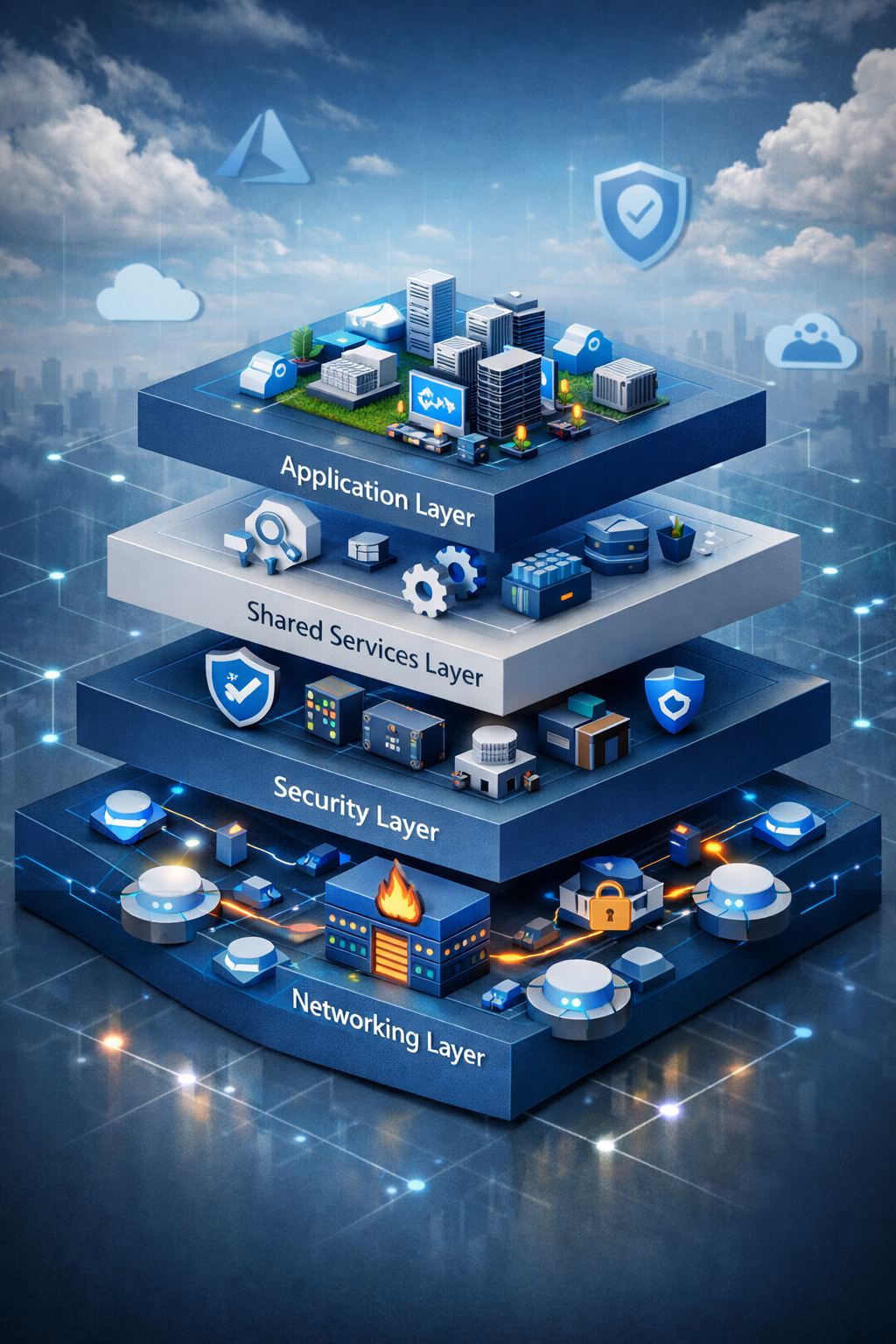
The previous two parts of this series covered what IaC is and how to get a local environment working. Before writing any infrastructure configuration, this article establishes the architectural model the rest of this series builds. This is the only article with no code and no deployment. Its purpose is to make the subsequent deployments legible — so that when you create a subnet later, you understand what it belongs to and why it exists.
Why layering matters
A flat Azure environment — resources deployed directly into subscriptions with no enforced structure — works at small scale and becomes unmanageable as it grows. Networking changes affect security resources. Security changes break application connectivity. A misconfigured firewall rule can cascade into a production outage. There is no clean boundary between “owned by the platform team” and “owned by the application team.”
The layered approach solves this by enforcing separation of concern at the architectural level. Each layer has a defined scope, a defined set of resources, a defined team owner, and a defined dependency relationship with adjacent layers. Changes within a layer do not require changes to other layers — unless an interface (an output) changes, which is a visible, explicit event.
This is the same principle as modularity in software: the value is not just code reuse, it is the ability to reason about and update one part of the system without needing to understand all of it.
The model used in this series has four layers. They are deployed in order because each consumes outputs from the layer below it. The order is not optional.
The four layers
Layer 1: Core Networking
flowchart TB

%% Mobile-first Azure Connectivity Hub (colorized)

classDef hub fill:#e6f2ff,stroke:#1a73e8,color:#000,stroke-width:2px;
classDef security fill:#ffe9e9,stroke:#d93025,color:#000,stroke-width:2px;
classDef dns fill:#e8f5e9,stroke:#188038,color:#000,stroke-width:2px;
classDef shared fill:#fff8e1,stroke:#f9ab00,color:#000,stroke-width:2px;
classDef external fill:#f3e8ff,stroke:#9334e6,color:#000,stroke-width:2px;
classDef infra fill:#f5f5f5,stroke:#5f6368,color:#000,stroke-width:2px;

subgraph CONN["Connectivity Subscription"]

    subgraph HUBRG["Hub Resource Group"]

        HUB["Hub VNet
10.100.0.0/20"]
        GW["VPN Gateway
GatewaySubnet
10.100.0.0/27"]
        FW["Azure Firewall
AzureFirewallSubnet
10.100.1.0/26"]
        DNSIN["DNS Resolver
Inbound"]
        DNSOUT["DNS Resolver
Outbound"]
        SHARED["Shared Services"]
        PE["Private Endpoints"]
        SPOKES["Future Spoke VNets
10.101.x.x – 10.105.x.x"]

    end

    subgraph DNSRG["DNS Resource Group"]
        ZONES["Private DNS Zones"]
    end
end

ONPREM["On-Prem Networks"]

HUB --> GW
HUB --> FW
HUB --> DNSIN
HUB --> DNSOUT
HUB --> SHARED
HUB --> PE

SPOKES -. Peering + UDR .-> HUB
ONPREM --> GW
ZONES -. VNet Link .-> HUB

class HUB hub
class GW,FW security
class DNSIN,DNSOUT,ZONES dns
class SHARED,PE shared
class SPOKES,ONPREM external
class CONN,HUBRG,DNSRG infra
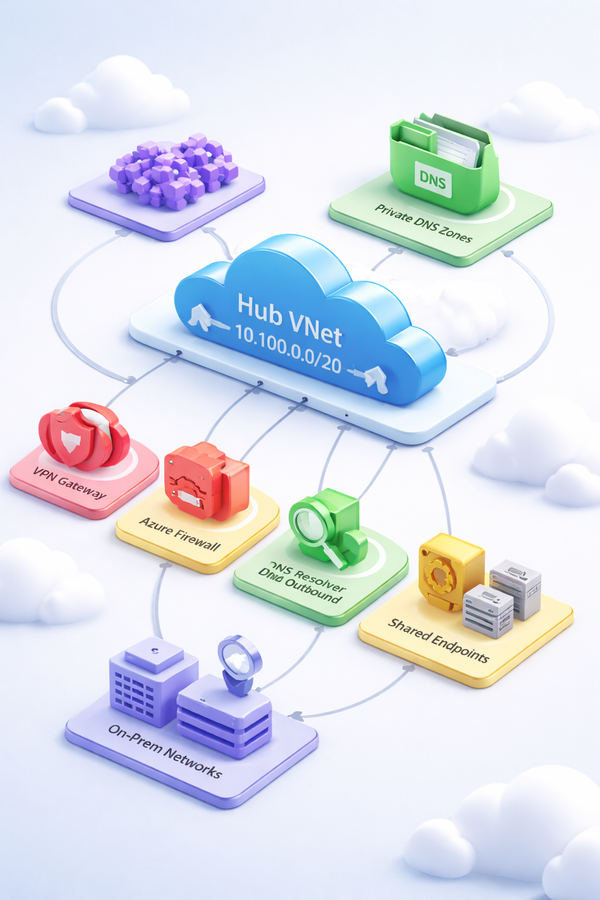
The networking layer is the traffic control plane for everything above it. It lives in a dedicated Connectivity subscription under the Platform management group. This subscription is owned by the platform networking team and is the only subscription with authority to modify hub network resources.
The physical shape of this layer is hub-and-spoke. A single hub virtual network hosts all shared network infrastructure. Every workload environment gets its own spoke virtual network that peers to the hub. Traffic between spokes, and between spokes and the internet or on-premises networks, flows through the hub — specifically through Azure Firewall, which inspects and permits or denies it based on policy rules.
The hub VNet hosts the resources that every workload depends on:
Azure Firewall is the central inspection point for all traffic crossing network boundaries. It evaluates three rule types in order: DNAT rules (for inbound NAT), network rules (L4, IP/port-based), and application rules (L7, FQDN-based). All spoke subnets have a User-Defined Route sending their default traffic (0.0.0.0/0) to the firewall’s private IP. This is the mechanism that makes hub-and-spoke more than just shared routing — it makes the firewall an unavoidable chokepoint.
Azure Private DNS Resolver handles hybrid DNS. It provides an inbound endpoint that receives DNS queries forwarded from on-premises networks over ExpressRoute or VPN. It provides an outbound endpoint that forwards queries from Azure VMs to on-premises DNS servers. Private DNS Zones — one per Azure PaaS service using Private Link — are linked to the hub VNet. When a workload connects to a storage account or Key Vault via private endpoint, the DNS query resolves to a private IP through this mechanism.
VPN and ExpressRoute Gateways provide the on-premises connectivity path. The VPN gateway handles encrypted internet-based connectivity; ExpressRoute handles dedicated private circuits with higher throughput and reliability guarantees. Both coexist in the same GatewaySubnet.
DDoS Protection attaches at the VNet level, protecting all public IPs within the scope of the plan — the firewall’s public IP, the VPN gateway’s public IP, and any public IPs in peered spoke VNets.
Route tables are the enforcement mechanism that makes the topology function. Every workload subnet in every spoke has a route table forcing default traffic to the firewall. The GatewaySubnet also carries routes pointing spoke CIDRs to the firewall — without these, return traffic from on-premises would arrive via a direct path, creating asymmetric routing that causes silent packet drops.
Layer 2: Core Security
10.100.0.0/20"] S1["GatewaySubnet
VPN Gateway"] S2["AzureFirewallSubnet
Azure Firewall"] S3["AzureBastionSubnet
10.100.2.0/26"] S4["snet-pe
10.100.5.0/24"] S1 --> S2 --> S3 --> S4 end subgraph RG_SEC["rg-security-eastus"] NSG["NSG
nsg-bastion"] BASTION["Azure Bastion
Standard SKU"] KV["Platform Key Vault
RBAC + Private Endpoint"] PE["Private Endpoint
pe-kv-platform"] NSG --> BASTION --> PE --> KV end subgraph RG_MGMT["rg-management-eastus"] LAW["Log Analytics Workspace"] DCR1["DCR
VM Insights"] DCR2["DCR
Change Tracking"] DCR3["DCR
Defender for SQL"] AA["Automation Account"] UAMI["UAMI
uami-ama"] LAW --> DCR1 --> DCR2 --> DCR3 --> AA --> UAMI end FWP["Firewall Policy RCG
Priority 1000"] end DIAG["Diagnostic Settings"] DEFENDER["Defender for Cloud"] CONTACT["Security Contact
secops@contoso.com"] %% Vertical external flow FWP --> S2 NSG --> S3 PE --> S4 DIAG --> LAW DEFENDER --> CONN CONTACT --> CONN
The security layer does not have a clean subscription boundary the way networking does. It spans multiple subscriptions because its components operate at different scopes: Azure Policy is assigned at the management group level, Microsoft Defender for Cloud operates per-subscription, and Bastion, Key Vault, and the central observability platform all deploy in the Connectivity subscription alongside hub network resources.
The organizing principle is Zero Trust: verify explicitly, use least privilege, assume breach. This is not a topology — it is an operating model applied across the entire estate. The network layer provides defense in depth, but Zero Trust means the network boundary is not a trust boundary. Every request is authenticated. Every access is authorized based on identity, not network location.
Log Analytics Workspace is the telemetry foundation of the estate and belongs in this layer, not in shared services. Observability is a security control — you cannot reason about security posture without telemetry. Placing the workspace here also eliminates a deployment ordering problem: diagnostic settings on the Firewall, Bastion, VPN Gateway, and Key Vault all require the workspace to exist in the same apply. Deferring the workspace until a later layer would require a two-phase deployment with deliberate forward references. The workspace, its linked Automation Account, the User-Assigned Managed Identity for Azure Monitor Agent, and three Data Collection Rules (VM Insights, Change Tracking, Defender for SQL) are all provisioned as part of this layer.
Microsegmentation through NSGs and Application Security Groups. Network Security Groups apply at the subnet and NIC level. Application Security Groups let you write rules that reference logical groups rather than IP addresses, which remain valid as resources scale. The layered traffic path is: VNet boundary → NSG (L3/L4) → Azure Firewall (L7) → application. Each layer operates independently — a firewall bypass does not circumvent the NSG.
Private Endpoints eliminating public attack surface. Every PaaS service (storage accounts, Key Vaults, container registries, SQL databases) gets a private endpoint in the consuming subnet, with publicNetworkAccess: Disabled set on the service itself. The public endpoint ceases to exist. DNS resolution for the service name returns the private endpoint’s NIC IP. This is enforced by Azure Policy with DeployIfNotExists effects — when a private endpoint is created, the policy automatically creates the DNS zone group that registers the record in the correct Private DNS Zone.
Azure Bastion replacing jump boxes. Bastion provides browser-based and native-client SSH and RDP access to VMs without exposing management ports on the VMs themselves. There are no public IPs on managed VMs. The Bastion host lives in AzureBastionSubnet in the hub and can reach VMs in peered spoke VNets. Combined with Privileged Identity Management for just-in-time role activation, this closes the standing-access attack surface.
Platform Key Vault stores certificates and bootstrap credentials used by the platform team — items that predate any workload and exist at the infrastructure layer. The vault has no public endpoint; it is reachable only via its private endpoint in snet-pe, whose DNS registration resolves through the hub’s Private DNS Zones.
Defender for Cloud provides posture management (Secure Score, attack path analysis, vulnerability scanning) and workload protection plans per resource type — servers, containers, databases, Key Vault. Its data collection path is the Azure Monitor Agent with the DCRs provisioned alongside the workspace. Microsoft Sentinel, if enabled, runs on top of the same Log Analytics Workspace.
Azure Policy as the preventive control. The ALZ policy library contains approximately 106 custom policy definitions. Key effects: Deny prevents resource creation that violates standards (no public IP in Corp landing zones, no management ports exposed to internet, no subnets without NSGs). DeployIfNotExists automatically remediates non-compliance (enable Defender plans, create DNS zone groups, configure diagnostic settings). Modify applies tagging inheritance. These policies assign at the management group scope, which means they apply to all subscriptions and resources beneath without per-subscription configuration.
Layer 3: Core Shared Services
The shared services layer deploys to a Shared Services or Management subscription under the Platform management group. It provides compute and artifact infrastructure consumed by multiple workload teams but owned and operated by the platform team. The distinction from the security layer is ownership and purpose: observability and access control belong in security; reusable build and runtime artefacts belong here.
Azure Container Registry (Premium SKU) is the shared image store for container workloads across the estate. Premium is the only tier that supports private endpoints, geo-replication, content trust, and customer-managed keys — all requirements at enterprise scale. AKS clusters in spoke subscriptions are granted AcrPull on this registry. No image pull secrets are needed in pods; the kubelet managed identity authenticates directly.
Azure Compute Gallery is the central repository for versioned, replicated VM images. Platform teams build golden images using Packer in CI/CD pipelines, publish them to the gallery with semantic versioning, and replicate them to target regions. Application teams reference a specific image version or always-latest when provisioning VMs. This eliminates the drift that accumulates when teams build their own base images independently.
Diagnostic log archival storage account receives platform telemetry that needs long-term retention beyond the Log Analytics Workspace’s interactive window. Standard GRS replication, lifecycle policies that move data to Cool after 30 days and Archive after 90, and a private endpoint with publicNetworkAccess: Disabled. This is a separate storage account from the Terraform state storage account — different access controls, different retention requirements, different ownership.
Azure Monitor Baseline Alerts (avm-ptn-monitoring-amba-alz) deploys the standardised Azure Monitor alert set for landing zone resources. AMBA creates policy-based alert rules that apply automatically as subscriptions are added under the management group hierarchy. It depends on the Log Analytics Workspace from the security layer for alert routing.
The shared services layer does not include a Log Analytics Workspace — that is provisioned in the security layer and consumed here as an input. The AMBA module and the archival storage diagnostic settings both reference the workspace ID from the security layer’s remote state.
Layer 4: Application
Application workloads deploy into Landing Zone subscriptions under the Corp or Online management group, depending on whether the workload is internal or internet-facing. Each workload gets its own subscription and its own spoke VNet. The subscription vending process (covered in a later article) provisions the subscription, creates the spoke VNet, establishes hub-spoke peering, configures the default route table, and assigns RBAC — in a single automated pipeline run.
Application teams own everything within their spoke subscription. The platform enforces governance through inherited Azure Policy assignments from parent management groups — application teams cannot disable Defender, cannot create public IPs (in Corp), cannot bypass the private endpoint requirement. Within those guardrails, they deploy their workloads independently.
The spoke VNet layout depends on the workload type. AKS clusters require a node subnet, a delegated API server subnet, subnets for internal load balancers and Application Gateway, and a private endpoint subnet. App Service Environments require a dedicated /24 delegated subnet. SQL Managed Instance requires its own delegated /24. These requirements must be planned into the spoke VNet address space before any workload is deployed — subnets cannot be resized without deletion, and delegations cannot be changed while resources exist in the subnet.
The dependency chain
The four layers have a strict deployment dependency. Violating the order causes deployment failures.
Layer 1: Core Networking
    └── Layer 2: Core Security
            └── Layer 3: Core Shared Services
                    └── Layer 4: Application
The networking layer has no dependencies — it is deployed first. The security layer depends on networking because Bastion lives in the hub VNet and the Key Vault private endpoint connects to snet-pe. The shared services layer depends on security because AMBA and the archival storage account both reference the Log Analytics Workspace ID. The application layer depends on shared services because workload deployments reference the ACR login server and Compute Gallery image IDs.
The Log Analytics Workspace and the hub VNet can be deployed in parallel — neither depends on the other at creation time. In this series they are sequenced (networking first, security second) for pedagogical clarity, but a production pipeline that optimises for speed would deploy them concurrently.
Within the application layer, the order is: subscription → spoke VNet → peering → route table associations → NSGs → workload resources → private endpoints. Private endpoints are always last because they depend on the PaaS resource existing, the subnet existing, and the Private DNS Zone existing.
Subnet strategy: the decision that cannot easily be undone
Subnets are not resizable without deletion. Subnet delegations cannot be modified while resources exist in the subnet. The subnet layout decisions made during hub VNet deployment are effectively permanent for the life of the hub. This makes IP address planning one of the highest-leverage design decisions in the entire series.
Several subnets in the hub have exact names required by Azure — the resource will not deploy to a subnet with any other name:
| Subnet | Required name | Minimum size | Constraints |
|---|---|---|---|
| Azure Firewall | AzureFirewallSubnet |
/26 | No other resources, no NSG |
| Azure Firewall Management | AzureFirewallManagementSubnet |
/26 | Required only for forced tunneling |
| VPN/ExpressRoute Gateway | GatewaySubnet |
/27 | No NSG allowed |
| Azure Bastion | AzureBastionSubnet |
/26 | No UDR supported |
| Azure Route Server | RouteServerSubnet |
/27 | BGP exchange |
| DNS Resolver Inbound | Any name | /28 | Delegation: Microsoft.Network/dnsResolvers |
| DNS Resolver Outbound | Any name | /28 | Delegation: Microsoft.Network/dnsResolvers |
| Shared Services | Any name | /24 recommended | Jump boxes, domain controllers |
| Private Endpoints (platform) | Any name | /24 recommended | Platform-level PaaS endpoints |
The same constraint applies to spoke subnets hosting delegated Azure services. AKS API Server VNet Integration requires a dedicated /28 delegated to Microsoft.ContainerService/managedClusters. App Service requires a /26 minimum (one subnet per App Service Plan) delegated to Microsoft.Web/serverFarms. ASEv3 requires a /24. SQL Managed Instance requires a /24. Azure NetApp Files requires a /24 and only one delegated subnet per VNet. None of these can share a subnet with other resources.
The practical implication: spoke VNets must be sized to accommodate all services the workload might ever need, not just the services it needs today. A /24 spoke becomes a constraint quickly when AKS nodes, the API server subnet, an Application Gateway subnet, internal load balancer subnets, and private endpoint subnets are all competing for address space.
The address plan used throughout this series allocates address space per region in contiguous blocks:
Hub VNet (East US):      10.100.0.0/20   (4,096 addresses)
  GatewaySubnet:           10.100.0.0/27
  AzureFirewallSubnet:     10.100.1.0/26
  AzureFirewallMgmtSubnet: 10.100.1.64/26
  AzureBastionSubnet:      10.100.2.0/26
  DNSResolverInbound:      10.100.3.0/28
  DNSResolverOutbound:     10.100.3.16/28
  RouteServerSubnet:       10.100.3.32/27
  SharedServices:          10.100.4.0/24
  PrivateEndpoints:        10.100.5.0/24

Spoke — Production:      10.101.0.0/20
Spoke — AKS:             10.102.0.0/18   (large: node pools consume IPs at scale)
Spoke — Data Platform:   10.103.0.0/20
Spoke — Staging:         10.104.0.0/20
Spoke — Dev:             10.105.0.0/20
The hub is allocated a /20 (4,096 addresses) rather than the /16 sometimes recommended. In practice, the hub hosts network infrastructure, not workloads — 4,096 addresses is sufficient for all named subnets plus growth. On-premises connectivity and any future secondary hub VNet are allocated from the 10.0.0.0/16 range, which never overlaps with the Azure 10.100.x.x – 10.105.x.x range. Gaps between spoke allocations provide room for future spokes without disrupting address summaries.
How this maps to Azure Landing Zones
The four-layer model is the implementation view. The Azure Landing Zones framework from the Cloud Adoption Framework provides the governance view. The two are complementary, not competing.
The CAF management group hierarchy establishes where each layer lives and what policies govern it:
| Layer | CAF component | Subscription | Policy scope |
|---|---|---|---|
| Core Networking | Platform → Connectivity | Connectivity subscription | Platform MG policies |
| Core Security | Spans platform subs + MG scope | Connectivity + Management | Root + Platform MG |
| Core Shared Services | Platform → Management | Management subscription | Platform MG policies |
| Application | Landing Zones → Corp or Online | Per-workload subscriptions | Corp/Online MG policies |
Azure Policy at the management group level is what turns the layered architecture from a convention into an enforced constraint. A Deny policy at the Landing Zones management group prevents application teams from creating public IPs in Corp subscriptions — they physically cannot bypass it regardless of their subscription-level RBAC permissions. A DeployIfNotExists policy automatically registers private endpoint DNS records when a private endpoint is provisioned — application teams get correct DNS resolution without needing to understand the hub Private DNS Zone structure.
The governance layer (management groups and policy assignments) is deliberately the last platform layer deployed — after networking and shared services — because the policy assignments reference the Log Analytics Workspace ID as a parameter. The workspace must exist before the policy assignments can be parameterized. In the ALZ Accelerator, this is handled differently (management resources are deployed first, policies assigned second). Either ordering works; the ordering here preserves a clear dependency flow.
How this series maps each layer to Terraform state
Each layer in this series has its own Terraform configuration and its own remote state file in Azure Blob Storage. The state boundaries are the architectural boundaries:
| Layer | State file key |
|---|---|
| Core Networking | platform/networking.tfstate |
| Core Security | platform/security.tfstate |
| Core Shared Services | platform/management.tfstate |
| Governance | platform/governance.tfstate |
| Subscription Vending | landingzones/<workload>.tfstate |
| Application Workloads | workloads/<workload>/<env>.tfstate |
Layers reference each other’s outputs through terraform_remote_state data sources. The networking layer outputs the hub VNet ID, firewall private IP, and subnet IDs. The shared services layer references the networking output to link Private DNS Zones to the hub VNet. The governance layer references the shared services output to parameterize policy assignments with the Log Analytics Workspace ID. This pattern — explicit outputs consumed as explicit inputs — is what makes the boundaries real rather than nominal.
What comes next
Article 4 deploys the core networking layer: the hub VNet, all hub subnets, Azure Firewall with a base policy, DNS Private Resolver, Private DNS Zones for core Azure services, and a VPN Gateway. The address plan above is the one used in that deployment. Every design decision covered in this article has a concrete Terraform expression in the next.
References: Azure hub-and-spoke network topology (learn.microsoft.com/en-us/azure/architecture/reference-architectures/hybrid-networking/hub-spoke); Azure Landing Zones design areas (learn.microsoft.com/en-us/azure/cloud-adoption-framework/ready/landing-zone/design-areas); Azure Firewall documentation (learn.microsoft.com/en-us/azure/firewall); Azure Private DNS Resolver (learn.microsoft.com/en-us/azure/dns/dns-private-resolver-overview); AVM module index (azure.github.io/Azure-Verified-Modules).